I rarely write to this blog anymore, but I don’t want to desert it. So I figured to at least update once a month on things that I picked up, even if they’re totally random.
Writing libraries for Haxe is actually pretty easy, but I totally avoided that at first because I thought it was some advanced wizardry. There are three ways to write libraries (or plugins, whichever is the correct term):
- Using extern
- Injecting code
- Magic code
1) Externs
Extern is written something like this (from my github page):
|
|
#if js @:native('wyn_ga') extern class WynGA { public static function init (id:String) : Void; public static function sendEvent (category:String, ?action:String, ?label:String, ?value:String) : Void; public static function sendSocial (network:String, ?action:String, ?target:String) : Void; public static function sendTiming (category:String, ?variable:String, ?value:String, ?label:String) : Void; } #end |
When you prepend extern to a class, it means that the class should exist outside of your haxe code. In my case above, my class
WynGA does not actually exist — it points to an object
wyn_ga I have written externally (or to be precise, it’s accessed via
window.wyn_ga ) and manually embedded in my index.html. The
wyn_ga object contains all the functions written above.
The reason (I think) you would want to use extern is when you have a lot of platform-specific code and can’t be bothered to write them in Haxe language. Or if you have code that doesn’t belong to you, e.g. JQuery, and you just want to point directly to the file (e.g. you have a
jquery-min.js file and just want to access it via
$ ) and use its available functions off the bat.
2) Injecting Code
If you want the code to be generated in your Haxe file rather than pointing to something external, you could inject code manually. Here’s an example (from my github page):
1 2 3 4 5 6 7 8 9 10 11 12 13 14 15 16 17 18 19 20 21 22 |
#if (sys_ios || sys_android_native) @:headerCode(' #include <WynGAKore.h> ') class WynGA { @:functionCode('WynGAKore::init(id);') public static function init (id:String) : Void {} @:functionCode('WynGAKore::sendEvent(category, action, label, value);') public static function sendEvent (category:String, ?action:String, ?label:String, ?value:String) : Void {} @:functionCode('WynGAKore::sendSocial(network, action, target);') public static function sendSocial (network:String, ?action:String, ?target:String) : Void {} @:functionCode('WynGAKore::sendTiming(category, variable, value, label);') public static function sendTiming (category:String, ?variable:String, ?value:String, ?label:String) : Void {} } #end |
Unfortunately, code injection only works on cpp targets for now (android-native, iOS, desktop/mac).
What the code above basically does, is inject raw C++ code into the first line of the function’s {} block. Since you’re injecting code using string, you have to beware of typos and syntax errors yourself.
Note: The snippet above does not work on its own — you still have to write the native implementation of the code above, in the case above, you will need to have a
WynGAKore.cpp and
WynGAKore.h file. Check out my Github page for an idea of how the folders are structured.
3) Magic code
This is the easiest it seems. Here is an example:
|
|
// For more info, check out http://old.haxe.org/doc/advanced/magic var website = untyped __js__("window.location.href"); var number = untyped __java__("int num1 = 10; int num2 = 15; return (num1+num2);"); // untested but I believe the syntax works. :P |
Magic code is basically raw code injected via haxe. Similar to injecting code, you have to be wary of typos and syntax errors. Also, you need to use compiler flags when using magic code. E.g. If you’re building to android target, the
__js__ code above will not work, and will throw an error.
Conclusion
I ended up having to use all three methods above. I use extern for javascript target, because it’s easier to just modify javascript files externally than to compile haxe->js repeatedly when debugging.
I use code injection to keep my .hx files intact, while being able to inject raw CPP code into the .hx functions. However, do remember that in my snippet above, I’m actually injecting some minor C++ code that call to the actual .cpp files’ functions. It’s a little long-winded, but the reason I’m doing this is to get the auto-completion to work in SublimeText. 🙂
I use magic code for small code snippets that don’t require any class, e.g. the js snippet above to get the
window.location.href . I don’t get auto-completion for using magic code, so I need to be extra careful when using it.

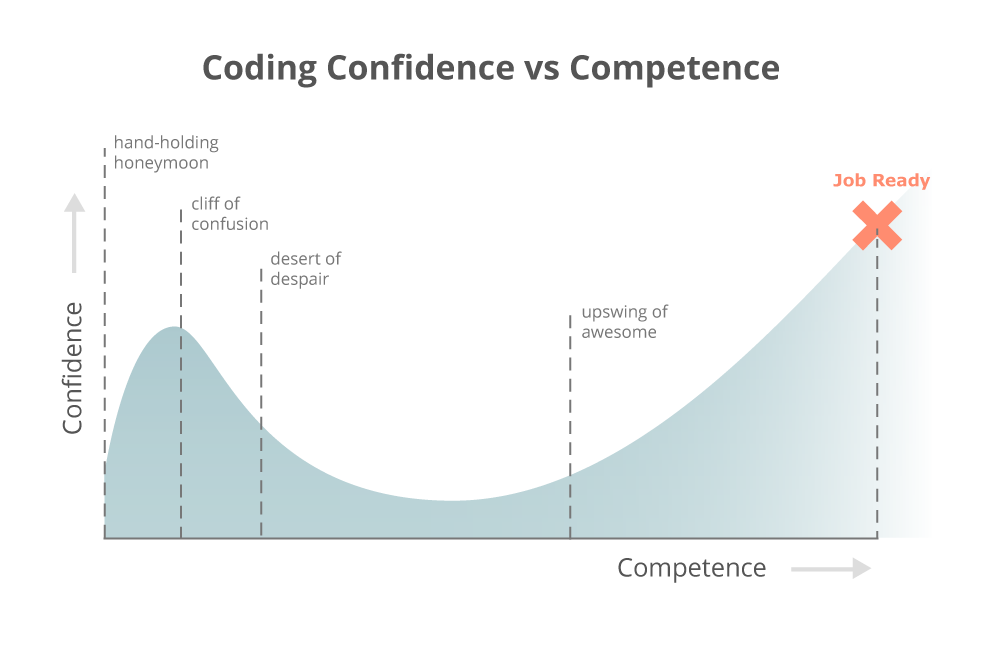 I will spare you the bush-beating of how hard I fell from my initial period of extremely bloated self confidence, into the pits of despair & loneliness. However, as a personal milestone, look! I’ve survived for two years as an indie gamedev. Things can’t possibly get any worse. Even if I’m way past my age to be a newbie in this industry, I can keep going, heck, maybe catch up one day. Maybe. I won’t know until I get there.